

Looking to start a new website for your business? If so, WordPress is a great platform that assists you with website creation and content management. Whether you are a beginner or an experienced developer, WordPress is the perfect platform to create wonders on your website. This article gives you a clear understanding of WordPress CMS for beginners covering its features, how it works, benefits, best practices, and more.
What is WordPress CMS?
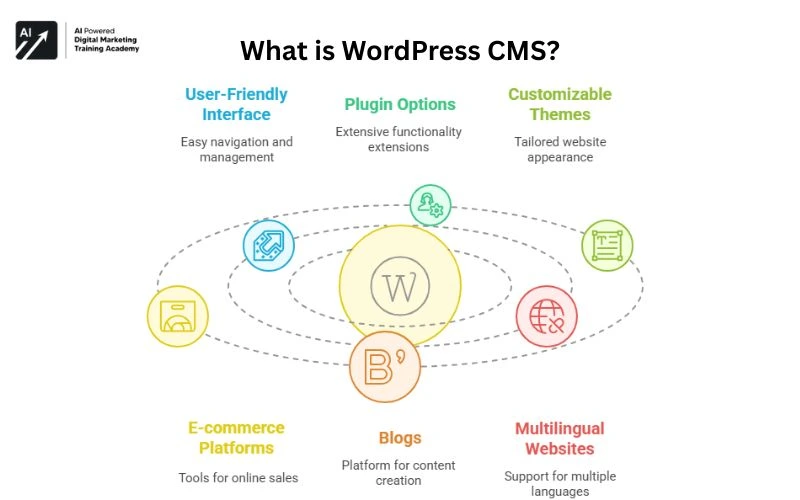
WordPress is a popular open-source Content Management System [CMS] that helps users to create and handle websites effectively. Not only websites, WordPress also deals with different elements like developing e-commerce platforms, blogs, and more. WordPress offers a user-friendly interface, a slew of plugin options, customizable themes, etc., so that the users can manage their blogs or websites seamlessly.
Originally, WordPress was launched as a personal blogging platform. Later, it has undergone several changes and ultimately evolved as an open-source platform. Both beginners as well as professional digital marketers can build a wide variety of websites through WordPress platform. Some of them include professional websites, e-commerce websites, blogs, multilingual websites, and a lot more.
Key Features of WordPress
Just take a quick look at the noteworthy features of WordPress that allow digital marketers to customize and optimize their site’s performance according to their needs.
User-Friendly Interface
WordPress offers a user-friendly interface so that the developers can start a new business website, e-commerce platform, personal blog, or anything effortlessly. Even people with zero coding knowledge can access this ideal content management platform. With the help of the user-friendly dashboard, the users can easily handle content, themes, media, plug-ins, etc. Even a beginner can create posts hassle-free and navigate through this simple interface.
Customizable Plugins and Themes
WordPress offers thousands of free themes from its directory that aid you in creating a website that you’ve been yearning to build. Apart from the free and premium themes, WordPress also allows you to upload a custom theme of your own. Likewise, WordPress also provides a vast plugin directory with more than 60,000 free plugin options. Using these plugins, one can create forums, add galleries and widgets, combine social media features, boost SEO rankings, etc. Through these customizable tools and plugin options, users can easily personalize their websites with a professional design without having advanced coding expertise.




Mobile-Responsive Design
Mobile responsiveness is a key feature that helps people to easily operate WordPress right from their smartphones. By default, most of the themes in WordPress are mobile-friendly, rendering a smooth user experience.
Adaptability
WordPress CMS is a convenient platform for both beginner blogs and enterprise-level websites. With its SEO-friendly structure, customizable plugin options, and perfect code, it helps websites rank at the top of the search engine results.
Secure Platform
Security is an important thing irrespective of the platform. WordPress has a strong, secure platform so that the users need not worry about their content or website security. Also, users can improve their website security using a variety of secured plugins and regular updates. WordPress gets regular updates automatically to ensure your website is secured and safeguarded against harmful security vulnerabilities.
Built-in Language Assistance
By default, WordPress is initiated in the US English language, but still, it can be used in more than 70 different languages. WordPress version 4.1 and above allows you to pick a language of your choice initially and also provides language-switching options anytime.
Benefits of WordPress CMS for Digital Marketing
Go through the major advantages of using WordPress CMS for digital marketing.
Cost-Effective
As mentioned earlier, WordPress is an open-source platform. As a result, the user need not buy any sort of license to access this software. WordPress offers both free and premium themes to set up the website. Mostly, free plugins available on WordPress render an adequate number of features to boost the site’s performance. To be precise, creating and running a website on the WordPress platform is very much cost-effective.
Content Marketing Capability
WordPress is an excellent option for content marketing as it helps the users manage content on the website. Scheduling posts, handling media, usage of plugins, tags, etc., are available on WordPress, making it easy for the users to better manage their website content and SEO.
WordPress-Compatible Tools
WordPress is compatible with a variety of marketing and analytic tools. WordPress supports integration with a variety of web analytics tools like Google Analytics, Hotjar, and more. Email Marketing is one of the significant areas in digital marketing. WordPress supports different email marketing platforms such as ConvertKit, Mailchimp, and more.
Custom Landing Pages
WordPress helps digital marketers build high-converting landing pages to carry out campaigns without the need to hire professional web developers. This is possible using page builders such as Beaver Builder, Elementor, Gutenberg, and more.
Integration of AI Plugins
CMS offers a wide array of advanced AI plugins for WordPress. AI allows you to create and manage your website efficiently and quickly. Using these AI plugins, users can easily finish certain tasks like creating content, generating images, automatic coding, chatbots, SEO, analyzing user behavior, etc. This sort of automation saves a lot of time compared to routine marketing tasks.
E-Commerce Services
WooCommerce is a free open-source platform used as a WordPress plugin. Users thinking of starting an e-commerce platform can access this plugin as it offers additional material to manage products, track sales, engage customers, deliver updates, inventory and stock, and a lot more. In a nutshell, digital marketers can use this plugin to set up an online store and handle everything within the WordPress platform.
WordPress Installation
The installation and WordPress setup process is quite simple. Just follow the steps given below:
- Pick a Domain & Reliable Hosting Provider: The first step is to choose a domain and register a domain name for your blog or website. Purchase reliable hosting from providers like Hostinger, SiteGround, Bluehost, etc. WordPress setup is not a risky procedure as the hosts provide just a one-click installation process to the users.
- Login: Once the installation process is done, just go ahead and log into your WordPress dashboard through yourdomain.com/wp-admin.
- Select a Theme: Choose a responsive theme from the repository of this open-source platform. It would be perfect if you select a theme which is both mobile as well as desktop-responsive. Several premium theme options are also available to the users on particular platforms such as ThemeForest, Envato Market, and more. After selecting a theme, customize the theme that befits your website and brand identity.
Plugins Installation
The next step is to install the required plugins on WordPress. Some of the essential plugins include:
- Elementor: Drag-and-drop page Interface
- MonsterInsights: Google Analytics Plugin
- WooCommerce: E-Commerce Platform
- WPForms: Form Creator
- Yoast SEO or Rank Math: For Search Engine Optimization [SEO]
Best Practices for WordPress
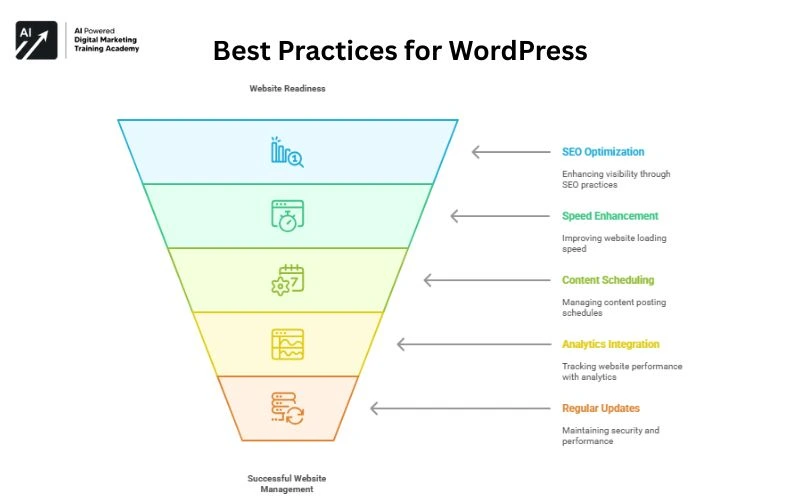
Once a website is ready, the key step is to optimize the site to gain organic traffic from the audience. GO through some of the best practices to manage a website successfully through WordPress.
- Search Engine Optimization: One of the key practices while using WordPress is to optimize the website speed by using certain caching plugins like W3 Total Cache or WP Rocket. Select a fast-loading theme so that the users won’t face any website lag issues. Using ShortPixel or Smush, you can compress images. Access certain tools like SEMrush or Ahrefs to audit your website frequently. Another important point is to generate high-quality content and build backlinks.
- Enhance Website Speed: Focus on the speed of your website so that the users can experience fast-loading of your site. For that, you must select responsive themes. Make sure you pick a Mobile-responsive theme as most of the audience access smartphones to search for anything online.
- Access Content Scheduling Tools: Using Editorial calendars and scheduling tools, you can easily manage regular posting schedules. For this, you can use specific Plugins such as CoSchedule or Editorial Calendar.
- Use Google Analytics and Tracking: To track your website performance and handle data-driven decisions, make sure you integrate analytics tools like Google Analytics and Search Console.
- Regular Updates: Make sure you update the website themes, plugins, and WordPress core regularly to improve the site’s performance. In addition, website security is the key thing while running a website. For this, use security plugins and backup solutions to secure the site data and handle uptime.
Final Thoughts
WordPress is a wonderful platform for people who are planning to start a business online or host a website and many more. With its exceptional features like huge set of plugin options, customizable themes, etc., wordpress just gives a big helping hand to the enthusiastic digital marketers.
Comments 4