
What are Google Ads
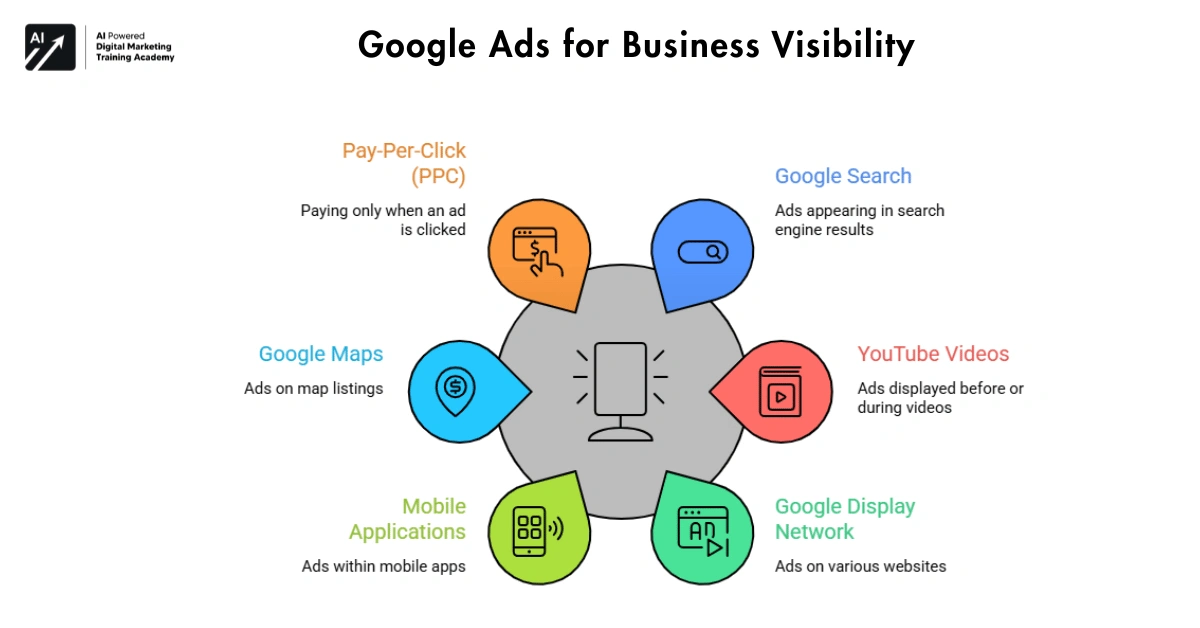 Google Ads are Google’s advertising solutions that allow companies to promote their businesses on the Google Network, including Google search.
These ads can appear in several places online, including:




- Google search engine results
- YouTube videos
- Websites within the Google Display Network
- Mobile applications
- Google Maps
Essentially, the function of Google Ads is to assist businesses in reaching customers directly when they are searching for information or solutions related to their products or services.
Unlike traditional advertising methods, Google Ads operates on a different principle. Instead, advertisers only pay when someone clicks on their ad. This model, known as Pay-Per-Click (PPC), helps businesses control their advertising costs.
For example:
A user searches for “best digital marketing course.”
Google lists quite a few ads on the top results page.
I also earn money when you click on the ads and if you click on them and go to the advertiser’s website or buy their product. I earn a small fee.
Our system maximizes Google Ads efficiency, allowing businesses to only pay for actual user interactions.
Key Features of Google Ads
One of the main reasons Google Ads is the most widely used advertising platform is the variety of powerful features it offers.
Below are some important features.
Pay-Per-Click Advertising
One of the biggest strengths of Google Ads is its PPC (Pay-Per-Click) business model.
Important points about PPC:
- You get paid for every advertiser click.
- Businesses control how much they spend
- Campaigns can start with small budgets
- Costs can be adjusted anytime
The versatility of Google Ads means that they can be appropriate for small businesses and larger organizations alike.
Targeted Advertising
Another key feature of Google Ads is audience targeting. With this capability, businesses can control exactly who sees their advertisements.
Businesses can control who sees their advertisements.
Google Ads allows targeting based on:
- Geographic location
- Age groups
- Language
- Device type
- Interests
- Search behavior
For example:
This example was given for a restaurant in Hyderabad. So, the ads would appear when someone searches for something using the keyword “Hyderabad”.
This feature helps businesses not waste their marketing money on irrelevant audiences.
Measurable Performance
In contrast, traditional advertising techniques such as print or billboards make it difficult to track performance. However, Google Ads provides detailed analytics that show exactly how your advertising budget is being spent.
Analytics allows you to see exactly where your Ad spend is going, solving a problem presented by Google Ads.
Businesses can track important data such as:
- Number of ad impressions
- Click-through rate
- Cost per click
- Conversion rate
- Advertising return on investment
With actual data in front of them, marketers can tweak their efforts for the better over time.
Why Google Ads is Important for Businesses
“Competing in today’s fast-paced marketplace is becoming increasingly difficult for retailers. Staying ahead of the demand and being in stock when customers need it most is a tough game. Companies need efficient ways to capture, fulfill orders, and connect with customers promptly in order to compete. “
Google Ads helps companies achieve this goal.
This section lists the reasons why businesses use Google Ads.
Instant Online Visibility
Search engine optimization is a very valuable function for this site and will continue to improve ranking over time.
Google Ads provides immediate visibility.
Key benefits include:
- Ads appear at the top of search results
- Businesses reach customers quickly
- New companies can compete with established brands
- Marketing campaigns launch instantly
Its high return on investment makes it very popular among startups to attract their first customers.
Reach Customers with Strong Intent
In addition to Demographic Targeting, retargeted lists, and Ad Extensions, Google Ads also offers intent-based marketing.
Users searching for something online are likely to be ‘about to buy’.
Examples of high-intent searches include:
- Buy laptop online
- Best digital marketing agency
- Affordable SEO services
- Restaurant near me
This search also brings up businesses that customers may be interested in should they want to buy or enquire about something related.
Budget Flexibility
Google Ads is suitable for different budgets.
Advertisers can:
- Set daily spending limits
- Increase budgets for successful campaigns
- Pause campaigns anytime
- Test campaigns before scaling
This control also enables organizations to manage their key marketing expenditure.
Local and Global Advertising
Google Ads supports both local and international marketing.
Businesses can run campaigns targeting:
- Specific cities
- Regions
- Countries
- Worldwide audiences
For example:
Geo targeting enables you to target users within a radius (defined in kilometers) of a location on your site. In the example above, the site is geo targeting users within a 10km radius of the salon.
An e-commerce brand can target customers globally
The extreme flexibility of Google Ads allows it to be very appropriate for a variety of industries.
How Google Ads Works
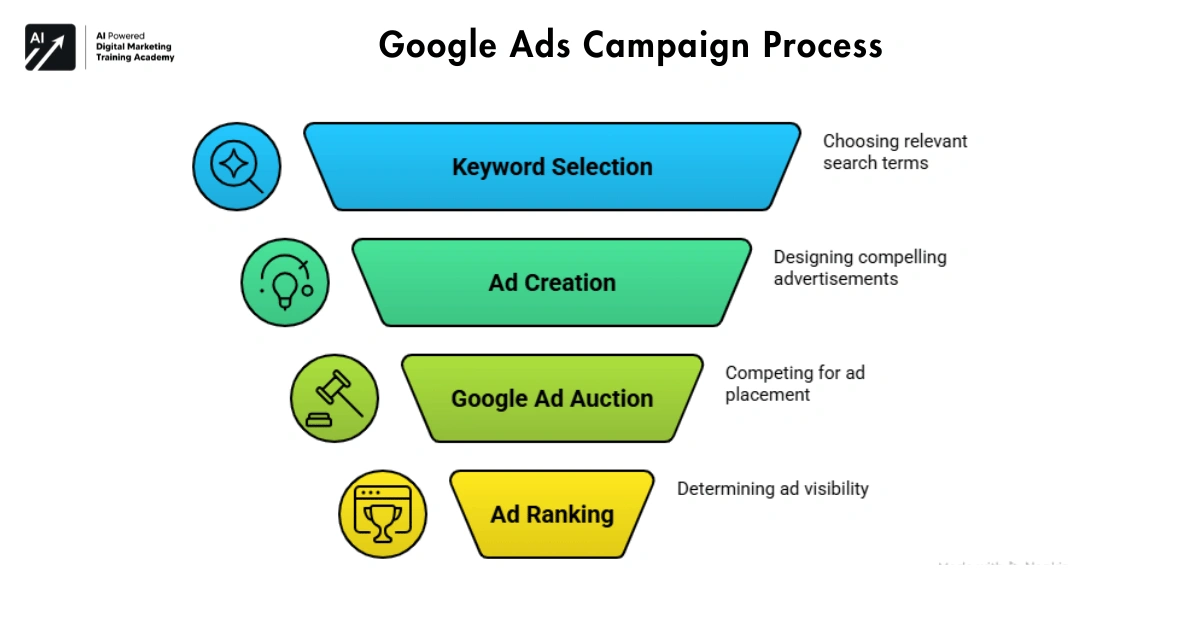 Know how Google Ads works. The platform uses an advertising auction system.
When you type your query and then press Search, Google is in warp drive to provide the most relevant and useful ads alongside your results. Every second counts.
The process involves several steps.
Step 1: Keyword Selection
First, advertisers choose keywords related to their business.
These are the search terms your website content targets to rank higher in search results.
Examples include:
- Best laptop for students
- Digital marketing training
- Affordable running shoes
- Online coding course
We will also use this information for advertising on Google when people type in these keywords.
Selecting the appropriate keywords for a PPC ad campaign is very important, because if you don’t choose the proper keywords your PPC ads may not display at all.
Step 2: Ad Creation
After selecting keywords, advertisers create advertisements.
A typical search ad includes:
- Headline
- Description
- Website link
The main target of this ad is to get noticed and to get clicks.
Strong advertisements usually include:
- Clear benefits
- Simple language
- A call-to-action
Example:
- Learn Digital Marketing in 3 Months
- Enroll Today limited Seats Available
Step 3: Google Ad Auction
For every search made on Google ad auction occurs between the various advertisers vying for the opportunity to reach users searching for specific keywords.
However, the highest bid does not always win.
Google considers several factors before showing ads.
These include:
- Bid amount
- Ad relevance
- Landing page quality
- Expected click-through rate
The system displays useful and relevant ads.
Step 4: Ad Ranking
Google calculates something called Ad Rank.
Another key element in the equation for determining ad position is Ad Rank. This is the rank that your ads receive relative to other advertisers on a search results page.
Having a higher Ad Rank increases your chances of appearing in the top positions.
Ad Rank depends on:
- Bid amount
- Quality Score
- Ad relevance
- Landing page experience
Furthermore, advertisers need to focus not only on effectively bidding for positions on the search result page but also on serving up high quality ads.
Understanding Google Ads Quality Score
Your Quality Score is a crucial factor in how well your ads are performing in Google Ads.
These metrics measure user engagement with an ad, measuring its relevance.
Google evaluates several elements to calculate Quality Score.
These include:
- Keyword relevance
- Ad copy quality
- Landing page experience
- Expected click-through rate
Higher Quality Scores provide several advantages.
Benefits include:
- Lower cost per click
- Better ad positions
- Improved campaign performance
It’s up to advertisers to deliver relevant, useful ads, however.
Advantages of Using Google Ads
Businesses choose Google Ads for several reasons.
Some key advantages include:
- Immediate search engine visibility
- Targeted audience reach
- Flexible advertising budgets
- Detailed performance tracking
- Scalable marketing campaigns
In addition to reaching your target audience with your website content, Google Ads allows you to also test and hone your advertising strategy to reach new clients.
Challenges of Google Ads
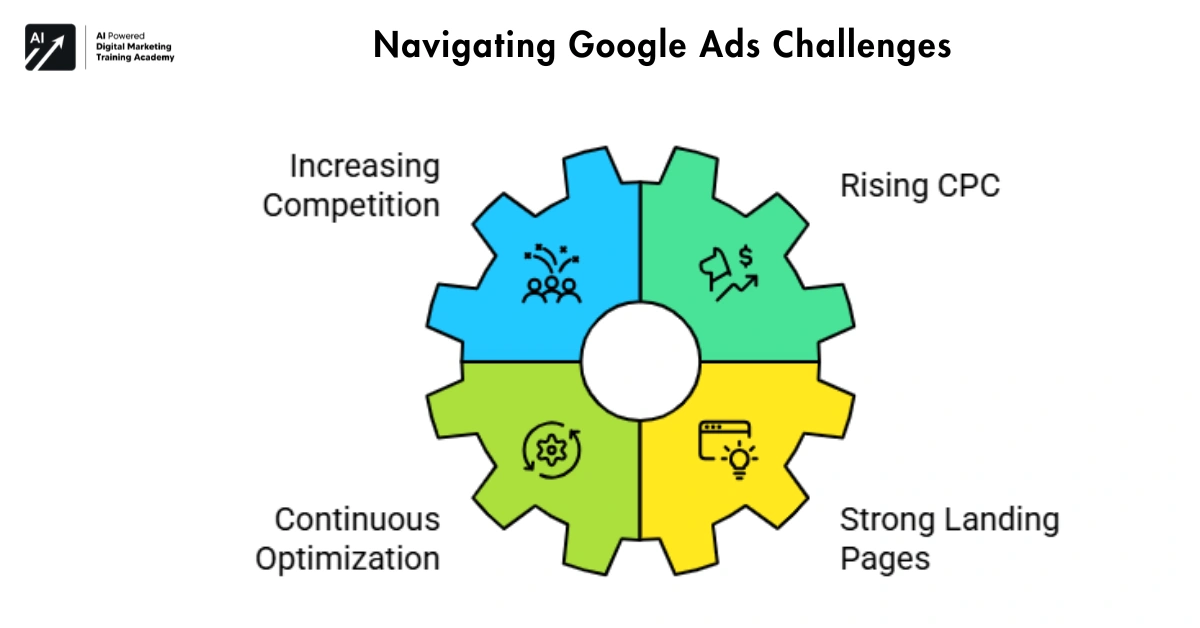 Google Ads is great, but it also needs managing well.
Some common challenges include:
- Increasing competition for popular keywords
- Rising cost per click in competitive industries
- Need for continuous campaign optimization
- Importance of strong landing pages
By learning how to effectively manage your campaigns businesses can overcome these difficulties.
Types of Google Ads Campaigns
A common misconception that is often held by customers is that Google Ads adverts are all of a similar form. In fact, Google Ads campaigns come in several different forms, and each has its own ways of functioning as well as objectives. The most important step when running Google Ads adverts is selecting the most appropriate campaign type to ensure that you are reaching your business goals.
Other social media campaigns have different objectives. Some have the main aim of increasing traffic to a company’s website, whilst others are trying to increase sales of particular products or perhaps even increase general brand awareness.
This tutorial is short but sweet as it covers the different main types of Google Ads campaigns.
Search Ads
The most common format of Google Ads is the search ad. However, most businesses that are starting out with Google Ads start with a mix of formats.
These ads appear on the results page of a Google search and are marked in yellow with the word “sponsored links” to the right of the regular search results.
For example, imagine someone searches for:
- Digital marketing course
- Best laptop for students
- Restaurant near me
On Search Cat our searches are topped off by search ads.
Search ads are the most powerful form of online advertising by reaching the most relevant searchers in Google searching for your product or service.
Important benefits of search ads:
- They target people with clear intent
- Appear when users search for keywords
- Can bring quick traffic to websites
- Help generate leads and sales
Search ads are typically very effective for businesses.
Display Ads
Display ads are a unique advertising medium. Unlike regular text ads, display ads are visual. Typically in a banner format and featuring graphic images and content, in addition to text.
These ads are also deployed on other sites throughout the Google Display Network.
In addition to showing display ads on this website, we can also show them in other places across the web, such as other websites, blogs, and even search results as you look for answers online.
You may see display ads in the following locations.
- Reading a news website
- Visiting a blog
- Watching online content
Reaching large audiences is what display ads are all about. Target audiences with display ads to build your company’s brand.
Key uses of display ads:
- Increase brand awareness
- Promote new products
- Reach users across many websites
- Stay visible to potential customers
Running traffic to your site can be frustrating at times, especially when you don’t seem to get any instant results. However, it’s also important to remember that although a user may not click in the immediate moment, they are not going to forget about you and your brand for future searches.
Video Ads
Video ads appear mostly on YouTube.
Video ads reach massive audiences by being placed on YouTube, one of the world’s leading online destinations.
Businesses often use video ads to:
- Tell their brand story
- Show product demonstrations
- Explain services
- Connect emotionally with viewers
There are 2 kinds of ads on YouTube.
Ad 1: Some ads come before you start a video (pre-roll ads).
Ad 2: Some ads come during a video (in-video ads).
Video is becoming a much more entertaining, effective form of video presentation online than your typical text-driven online presentation.
Shopping Ads
Shopping ads are mainly used by online stores.
In this video we see how our product ads display details of the product on the search results page.
Shopping ads usually display:
- Product image
- Product title
- Price
- Store name
- Ratings or reviews
For example, if someone searches:
- Buy laptop online
- Running shoes price
Google may show shopping ads with product images.
Our online shop allows customers to easily compare models before they purchase and have delivered.
These types of ads are useful for e-commerce sites since they enable you to drive traffic directly to your store and the product you are trying to sell. All the user has to do is click on the ad, and then they are on your store’s site browsing the product you want to advertise.
App Promotion Ads
Some businesses want to promote mobile apps.
Google Ads offers App campaigns for this purpose.
These ads can appear in several places:
- Google Search
- YouTube
- Google Play Store
- Mobile apps
- Display Network websites
The main goal of an app campaign is to get more app downloads.
Such adverts are normally taken up by big brands and famous names when launching a new mobile app.
Why Keyword Research is Important
Keywords are the heart of Google Ads.
Keywords are the words and phrases that a user types into the Google search bar and that are similar to the content or subject of your website.
For example:
- Best laptop for students
- Digital marketing course online
- Affordable SEO services
Choose the right keywords for your ads, and they will show up whenever customers search for related topics.
However, choosing the wrong keywords can waste money.
Therefore, keyword research is very important.
Keyword research helps businesses understand:
- What people search for
- How often they search
- How competitive the keyword is
This helps advertisers create smarter campaigns.
Types of Keywords in Google Ads
Different keywords have different characteristics. Some keywords are short and broad while others are longer and more specific.
In addition to allowing advertisers to target based on Facebook users’ Likes, Facebook has also recently begun to allow more granular targeting based on a number of other different account types, which the company is now calling different types of Facebook accounts.
Short-Tail Keywords
Short-tail keywords are very simple search terms.
Examples include:
- Shoes
- Laptop
- Marketing course
These keywords usually have:
- High search volume
- High competition
We have worked for a number of architectural groups, and a feature of this is that they serve a wide client base, and this is often reflected in the website structure and content.
If you’re looking for info on laptops instead of wanting to buy a laptop then you can read our comprehensive buyer’s guide to see if this will help you make a more informed decision.
Long-Tail Keywords
Long-tail keywords are more specific search phrases.
Examples include:
- Best laptop for college students
- Digital marketing course with certificate
- Running shoes for beginners
These keywords usually have:
- Lower competition
- More targeted traffic
People search for longer phrases that match what your site offers.
Therefore, long-tail keywords often bring better conversions.
Negative Keywords
Negative keywords help advertisers avoid unwanted searches.
For example:
This user may not want Premium shoe advertisers to show up in results for searches like:
- Cheap shoes
- Free shoes
Negative keywords are used so that ads do not appear in the search results for certain words or terms.
This helps save the advertising budget.
Google Ads Campaign Structure
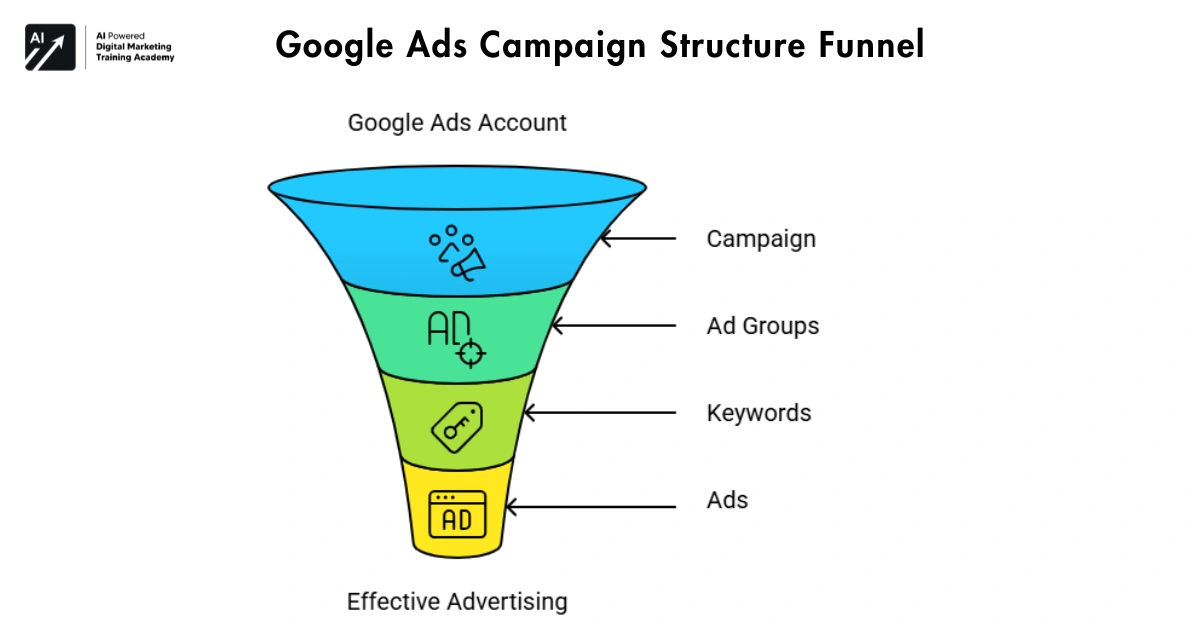 A well-organized campaign makes ads more effective.
Google Ads accounts follow a clear structure.
The structure includes:
- Account
- Campaign
- Ad Groups
- Keywords
- Ads
We will examine each level in turn.
Account Level
The account is at the top level.
Here, businesses manage:
- Billing information
- User access
- General settings
Most companies manage all campaigns inside one account.
Campaign Level
The campaign level defines the main advertising goal.
At this level, advertisers choose:
- Campaign type
- Budget
- Location targeting
- Language settings
For example:
A company may create:
- One campaign for lead generation
- Another campaign for product sales
This helps keep marketing efforts organized.
Ad Group Level
Ad groups organize ads inside a campaign.
Each ad group usually focuses on one topic.
For example, the shoe store might set up ad groups for Booties, High Heels, Sandals, Athletic Shoes, etc.
- Running shoes
- Sports shoes
- Formal shoes
This structure improves ad relevance.
Keyword and Ad Level
Inside each ad group, advertisers add:
- Keywords
- Advertisements
Create multiple ads for the same set of keywords.
Marketers test different ads to see which ones are most effective.
Google Ads Bidding Strategies
Bidding in Change Ad Exchanges is the amount that an advertiser is willing to pay for their advertisements to be displayed.
Google Ads offers several bidding strategies.
Our tactics and strategies for social media will vary depending on the nature and goals of a campaign or promotional effort.
Manual CPC
Manual CPC means Manual Cost-Per-Click.
We also allow advertisers to set the price they are willing to pay for a click.
Benefits include:
- Full control over bids
- Ability to adjust bids for different keywords
However, it requires regular monitoring.
Maximize Clicks
This is an automated strategy.
Bids are pre-set by Google to maximize click-through.
This method can be used to generate website traffic.
Target CPA
CPA means Cost Per Acquisition. This strategy focuses on generating conversions. Google aims to secure a fixed conversion price.
This technique is often utilized in lead generation campaigns.
Target ROAS
ROAS means Return on Ad Spend. This strategy focuses on revenue. Bids are dynamically adjusted to maximize conversion value.
E-commerce businesses often use this bidding method.
Writing Effective Google Ads
A good advertisement must attract attention quickly.
When people search online, they tend to scan search results rapidly. Google ads should therefore be clear and easy to read.
Important elements of a strong ad include:
- Clear headline
- Useful benefit
- Simple message
- Strong call-to-action
Examples of call-to-action phrases:
- Learn More
- Buy Now
- Get Started
- Enroll Today
Testing different ad messages helps improve performance.
Best Practices for Google Ads Campaigns
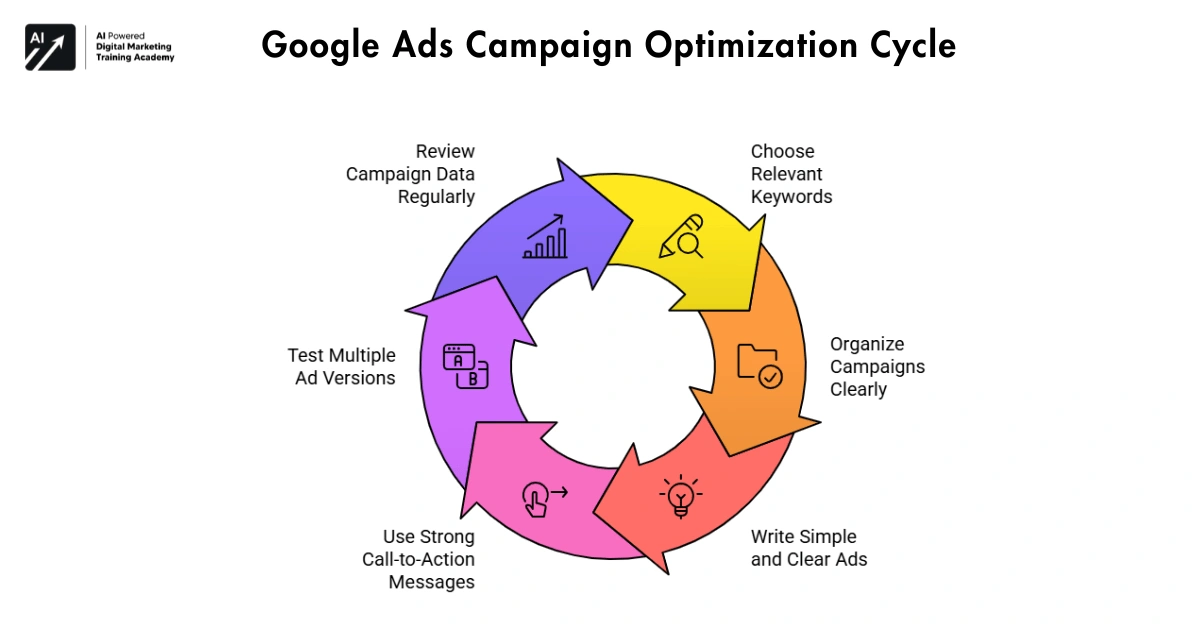 Successful campaigns require planning and improvement.
Some useful practices include:
- Choose relevant keywords
- Organize campaigns clearly
- Write simple and clear ads
- Use strong call-to-action messages
- Test multiple ad versions
- Review campaign data regularly
These tips can be used to enhance the performance of your next email campaign and create even greater results with future marketing efforts.
Landing Page Optimization for Google Ads
Many are focused on generating clicks for their ads. A click is valuable, but just as important, if not more so, is what happens to the user after the click. That user landed on a page of your website – we call that the “landing page”.
Your landing page is important to draw site visitors in and convince them to take action whether it is to purchase, sign up for a service, or contact the company for more information. A clear landing page helps users determine their best course of action, and as with any quick process, extraneous content or slow loading times are things you cannot afford.
So, your Google Ads landers are also important for your Google Ads campaign success.
Important Elements of a Good Landing Page
The effectiveness of your landing pages is
Clear and Relevant Message
Make sure the design of the landing page is the same as the look and feel of the ad banners, the message and the promotion.
Headline should match up with the content of the page, i.e. if an ad includes “Learn Digital Marketing in 3 Months” then the landing page for that ad should explain the course.
Visitors should quickly understand:
- What the offer is
- How it helps them
- What they should do next
A clear message builds trust and encourages action.
Fast Page Speed
In addition to design and functionality, your website’s load speed is crucial for both user experience and your search rankings. Nobody wants to visit a slow website. Even more importantly, your site’s visitors will not be patient enough to wait for your pages to load.
Fast-landing page helps:
- Keep visitors on the page
- Improve user experience
- Increase conversions
Your business site should also load up quickly.
Mobile-Friendly Design
With so many users turning to the web for their searches, having your website capturing many of these leads means that your landing pages should be phone friendly.
Mobile-friendly page should:
- Display text clearly
- Have buttons that are easy to tap
- Load smoothly on small screens
Having a good mobile experience is key to driving action.
Clear Call-to-Action
It’s also worth ensuring that your landing pages have a focused purpose, therefore trying to encourage users to complete one particular action.
Common call-to-action examples include:
- Buy Now
- Sign Up
- Contact Us
- Get Started
Make your call buttons more prominent and prominent to attract more attention on your website and your landing pages.
Important Google Ads Metrics
One can literally burn money on ads without ever checking on the returns. A smart business can’t just run some marketing campaigns without keeping track of a few numbers to see where they’re at.
Google Ads provides many useful metrics.
Impressions
The number of times your ad is viewed by users.
For example, if an advertiser runs an average impact display ad, and that ad appears 1000 times on the search results page, then the ad had 1000 impressions.
This field shows how much of your advertisement has been viewed.
Click-Through Rate (CTR)
Click-Through Rate (CTR) is calculated as the number of clicks on an ad divided by an estimate of the number of times the ad was viewed.
A good CTR is creative because it is both relevant and interesting to customers.
For example:
We express performance of ads as a percentage of the tests run on a sample of 100 people. This is called the CTR (Click Through Rate).
If 100 people viewed an ad and 10 of them clicked on it, then the CTR would be 10%.
Improving ad headlines and messages can increase CTR.
Cost Per Click (CPC)
The Cost per click (CPC) is the price at which the advertiser pays per click on their advertisement.
Price for each keyword varies. More competitive industries tend to have higher CPC.
It is also useful to monitor this figure, as it gives you an idea of your advertising costs.
Conversion Rate
Conversion Rate for the Ad. This is calculated as the number of clicks on the Ad versus the number of actual conversions.
These actions may include:
- Buying a product
- Filling out a form
- Signing up for a newsletter
- Downloading an app
By that I mean conversion rate is probably the best indicator I have to date of how well a campaign is likely to perform.
Common Google Ads Mistakes
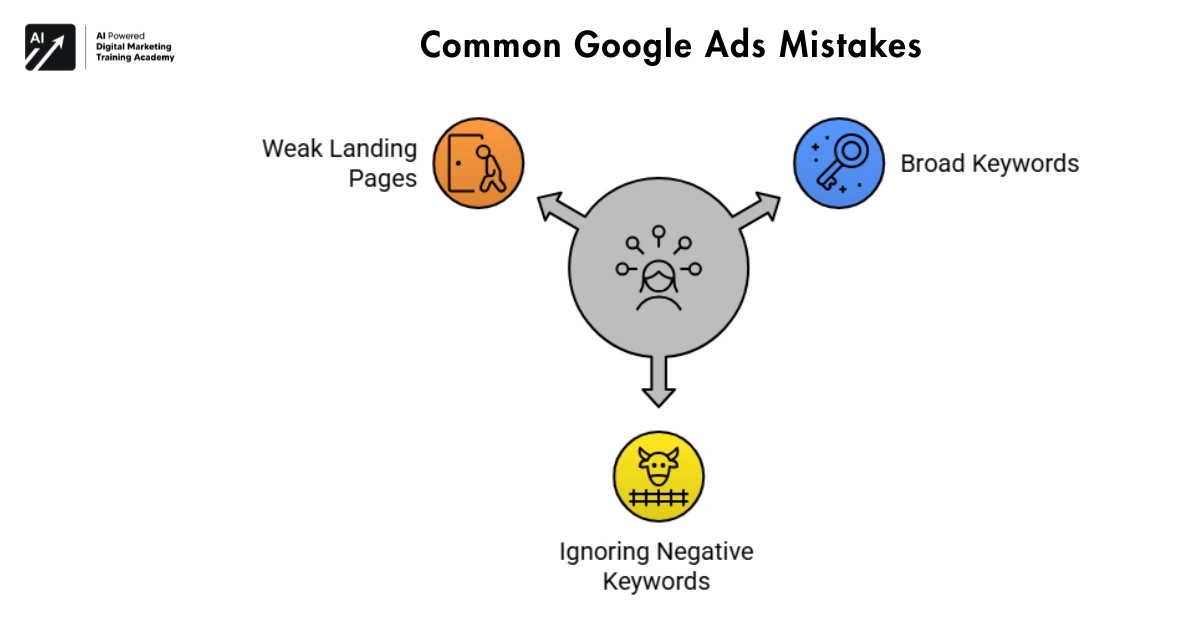 A lot of businesses have already come into advertising and miscalculated their efforts.
Here are some common problems advertisers face.
Using Very Broad Keywords
General keywords may attract too many unrelated searches.
For example:
- Shoes
- Marketing
- Laptop
More specific keywords usually bring better traffic.
Ignoring Negative Keywords
Negative keywords allow you to make sure your ads aren’t shown for searches that include words you specify are not relevant to your offering.
Online advertising relies heavily on clickjacking because, if it did not exist, then online advertisers would pay for individual clicks and therefore would result in no actual customers.
Weak Landing Pages
This problem occurs even when your ads are performing well, yet your landing pages aren’t converting your leads as you had hoped.
Common issues include:
- Slow loading speed
- Too much information
- No clear action button
Improving the landing page often improves results.
The Future of Google Ads
Digital advertising is growing year on year and becoming a huge industry. Just recently Google changed their advertising centre to allow larger and smaller businesses to reach customers in the most valuable ways possible.
Today, new technologies are changing how ads work.
Some important developments include:
- Artificial intelligence for campaign optimization
- Automated bidding systems
- Better audience targeting
- Advanced data insights
These tools help advertisers make smarter decisions.
Conclusion
Here at core.net we manage Google Ads campaigns for a number of our clients, as targeting Google Ads is likely one of the most effective forms of digital marketing currently available.
Targeting your website on Google Ads allows you to target users who are actively searching within content, news or product areas relevant to your brand.
For any organization, online marketers need to focus on selecting the best keywords for online ads, creating great ad copy messaging, and building an effective landing page that drives conversions.
Once live on the Google network it’s important to continually monitor the statistics, run some optimizations for users and make best use of you spend as a business owner looking to grow a business.
In an incredibly crowded online marketplace, Google Ads will continue to be an essential outlet for reaching your audience, bringing customers to your site and engaging with current and potential clients.