
Users move between devices and marketing channels multiply every year.Customer journeys become longer and more complex, because of this, basic analytics is no longer enough.This is where Google Analytics 4 comes in.
GA4 is the modern analytics system created by Google to help businesses understand how people truly interact with websites and apps. Some website owners are learning these skills while others ignore them. That small difference is already creating a gap.
Here is the truth many people miss:
- Analytics tools are not complicated.
- But the skills needed to use them wisely matter more than ever.
Event Thinking Understanding What Users Actually Do
What Is Event Thinking?
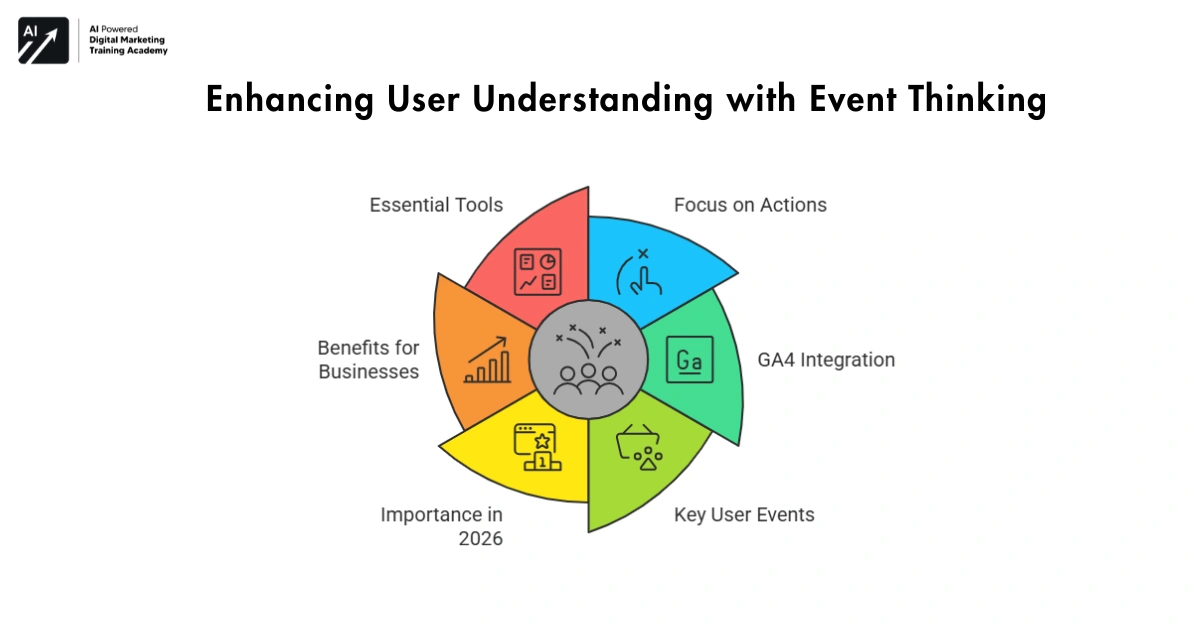
Event thinking is the ability to track meaningful user actions instead of only counting page visits. Earlier analytics tools focused mostly on page views. But page views do not always explain real behavior and GA4 works differently. It tracks events, which means actions users perform on your website.
Examples include:



- Clicking a button
- Scrolling through a page
- Downloading a file
- Watching a video
- Completing a purchase
Event thinking helps you focus on what truly matters and not just traffic, butt real interaction.
Why Event Thinking Matters in 2026
Websites today are interactive and visitors do not simply read and leave. They explore, compare, and interact.
People who understand event tracking can:
- Identify important user actions
- Measure engagement more clearly
- Improve conversion rates
Instead of guessing what users want, they see it through behavior.
Best Tools for Event Tracking:
- Analytics platforms designed for event tracking
- Behavior tracking tools for websites
- Digital measurement systems that monitor interactions
The real skill is not installing analytics and skill knowing which events matter most.
User Journey Mapping Understanding the Full Customer Path
What Is User Journey Mapping?
User journey mapping is all about seeing how people explore your website before they decide what to do next. In the past, people looked at individual page visits. But modern analytics tools focus on the complete journey.
A visitor might:
- Find your website through search
- Read a blog post
- Leave the site
- Return later through social media
- Finally make a purchase
GA4 connects these interactions together this helps you understand how decisions really happen.
Why User Journey Skills Matter
Most purchases do not happen instantly and users explore before they trust.
People who understand user journeys can:
- Improve navigation
- Remove confusing steps
- Make websites easier to use
Small improvements in the journey often lead to better results. Recommended Tools for Journey Analysis. Behavior analysis dashboards:
- Conversion path tracking tools
- Customer journey visualization systems
Understanding journeys helps businesses move from traffic thinking to customer thinking.
Conversion Funnel Thinking Finding Where Users Leave
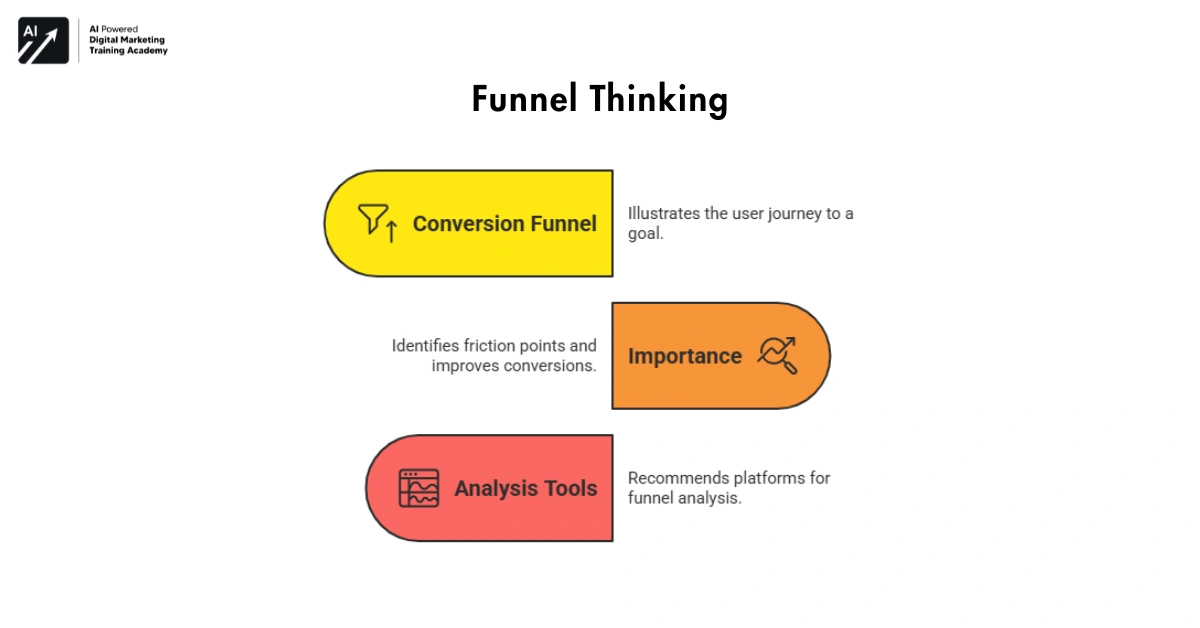
Conversion funnels illustrate the journey users take to reach a goal.
For instance:
Product page → Add to cart → Checkout → Purchase
Sometimes many users leave before finishing and funnels help you see exactly where this happens.
Why Funnel Thinking Is Important
Many websites lose potential customers because of small friction points.
Examples include:
- Slow pages
- Confusing forms
- Unclear pricing
When you analyze funnels, you can identify these weak points.Then you fix them step by step and even small improvements in funnels can increase conversions significantly.
Recommended Funnel Analysis Tools
- Conversion tracking platforms
- Behavior analytics dashboards
- Customer interaction analysis tools
The goal is simple and find where users struggle then make the journey easier.
Traffic Source Clarity Knowing Where Your Visitors Come From
What Is Traffic Source Analysis?
Traffic source analysis means understanding where your visitors come from. Every website receives visitors from multiple channels such as:
- Search engines
- Social media platforms
- Email campaigns
- Online advertisements
GA4 helps businesses identify which sources bring the most valuable users.
Why This Skill Matters
- Not all traffic is equal.
- Some visitors only browse.
- Others are ready to buy.
Knowing where the traffic comes from is most important for businesses to better target the channels that really make a difference.
For instance, marketing efforts frequently take place on platforms like:
- Google Ads
Analytics shows which channels generate real engagement.
Recommended Tools for Traffic Analysis:
- Search performance analytics platforms
- Marketing campaign tracking tools
- Digital traffic monitoring dashboards
Businesses can use information on sources of traffic to focus their efforts on the areas that matter.
Privacy-First Analytics and Consent Mode
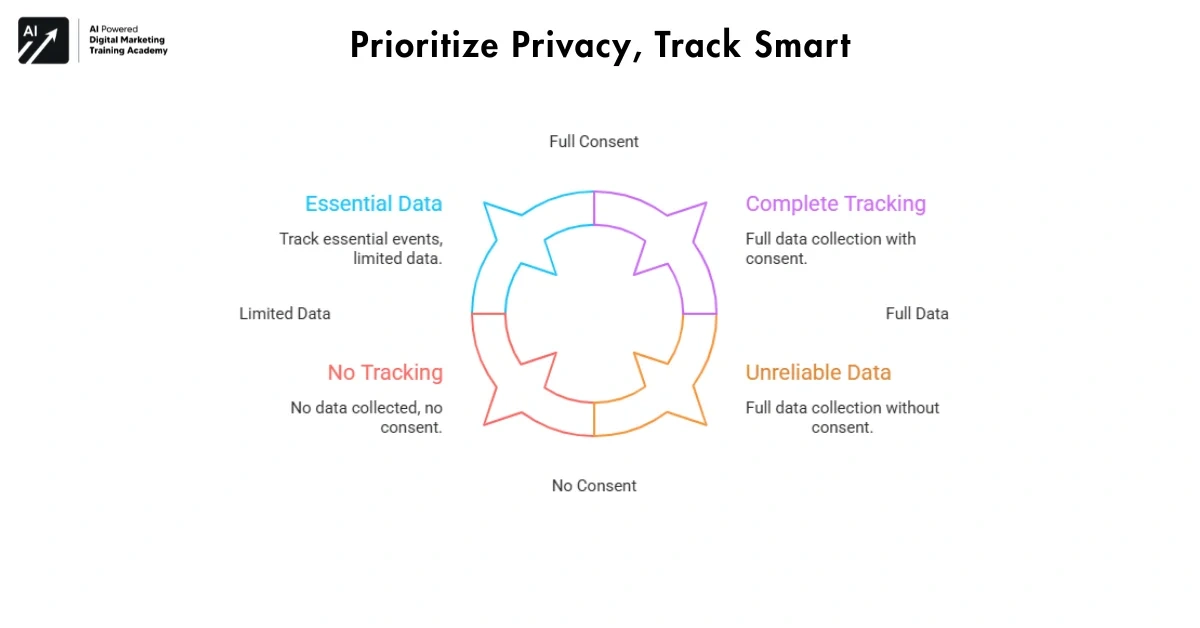
Where the internet was once moving towards a more permissive privacy policy, the pace has been gradually reversing. Browsers have begun to implement stricter controls, with many blocking third-party cookies and the public expecting a different level of services.
Websites are unable to follow users as before.Consent Mode is a feature that allows analytics to adjust tracking based on the user’s consent choices. When a visitor accepts tracking, full data is collected.
When a visitor declines, GA4 still gathers limited information using anonymous signals. This will enable organizations to keep analyzing the data while complying with privacy policies.
Why Privacy-First Tracking Matters in 2026
Privacy laws are spreading throughout many countries and these companies that disregard them lose precious information or find themselves in legal trouble.
- Collect data in a responsible way
- Maintain reliable analytics even with cookie restrictions
- Build trust with visitors
Tools & Tips
- Use Google Consent Mode in GTM
- Connect consent banners with analytics tags
- Track only essential events when consent is limited
Key point: Privacy-first analytics preserves user trust while balancing utility.
Audience Segmentation Understanding Different Types of Users
Understanding Segmentation of the market.
Audience segmentation refers to dividing visitors into segments based on their behavior. Not all visitors behave in the same way and some are new visitors. And others return regularly and some explore products but never buy. GA4 allows businesses to analyze these different groups.
Why This Skill Matters
When you understand your audience, communication becomes easier.
Businesses can:
- Create targeted marketing campaigns
- Improve content for specific users
- Personalize website experiences
This increases the engagement as well as and builds stronger relationships with customers. Recommended Tools for Audience Insights:
- Customer behavior analytics tools
- Segmentation dashboards
- Audience analysis platforms
The goal is simple and understand your visitors before trying to influence them.
First-Party Data Strategy
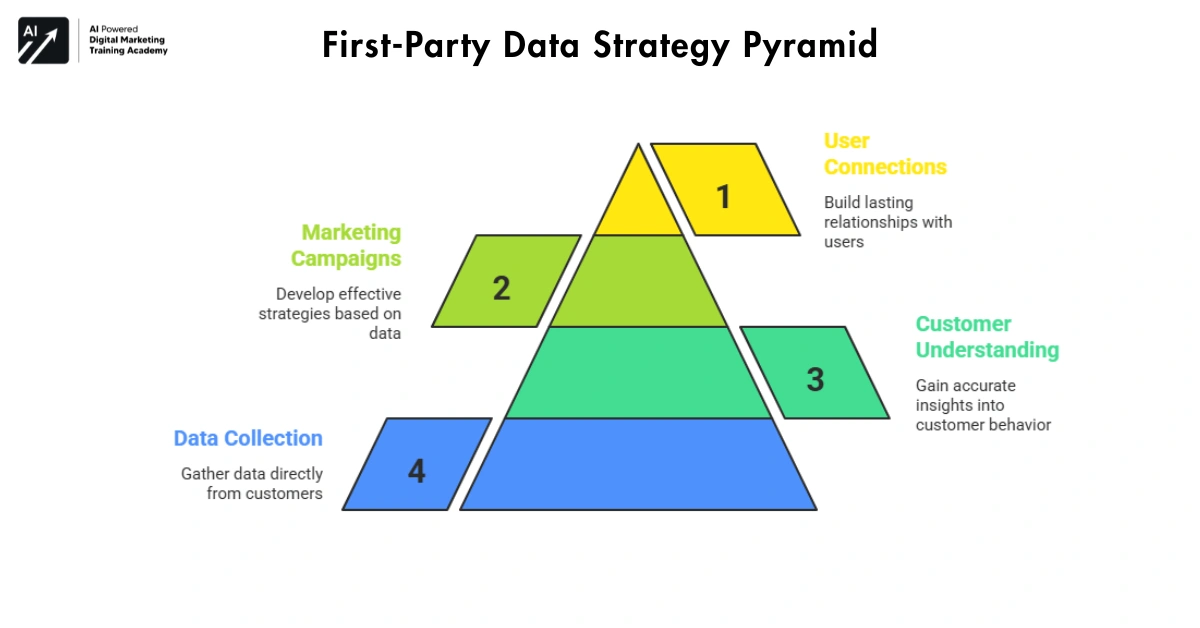
Previously, companies could only count on third-party data for marketing efforts. However, the effect of privacy updates and browser limitations is beginning to shift that reliance.
First-party data is data that you collect directly from your customers or site visitors. Examples of first-party data include your customers’ or site visitors’ registrations, product views, newsletter subscriptions and orders. First-party data is more important because it is collected directly from your visitors.
Why First-Party Data Matters
Businesses that build strong first-party data systems gain a major advantage.
They can:
- Understand customers more accurately
- Create better marketing campaigns
- Establish sustained connections with users.
Companies build knowledge about customers by themselves without depending on outside data providers.
Tools & Tips
- Use GA4 event tracking to capture key actions
- Store customer data in CRM systems
Data Clarity Making Decisions Without Guesswork
What Is Data Clarity?
Data clarity means understanding numbers in a simple and practical way. Analytics tools collect a lot of information but too much data can confuse people. The real skill is learning how to focus on meaningful insights.
Data clarity helps answer questions like:
- Which pages perform best?
- Where do users leave?
- Which campaigns bring results?
Why Data Skills Matter in 2026
Business today is based on data and companies that ignore data often repeat the same mistakes.
But companies that understand analytics can:
- Improve faster
- Reduce risk
- Make confident decisions
Data does not replace creativity and It simply guides better choices.
Recommended Tools for Data Clarity:
- Analytics dashboards
- Performance reporting tools
- Website behavior analysis platforms
The goal is not collecting more numbers and turning numbers into insight.
Continuous Optimization Improving Websites Over Time
What Is Continuous Optimization?
Continuous optimization is just like improving your website step by step by just using analytics insights. Instead of just guessing what works well, you test ideas and measure results.
For example:
- Improve page layout
- Adjust call-to-action buttons
- Simplify forms
- Optimize loading speed
Then you measure the impact and by just small improvements which build over time.
Why This Skill Creates Long-Term Growth
A great website is never created overnight and they evolve through testing and improvement.
People who understand optimization can:
- Improve conversion rates
- Increase engagement
- Create better user experiences
Analytics becomes a guide for constant progress.
Recommended Optimization Tools:
- Website testing platforms
- User behavior analysis tools
- Performance tracking systems
Optimization is not a “one-time” exercise and It is an ongoing process.
Predictive Insights Seeing What Might Happen Next
What Are Predictive Insights?
This new analytics enhancement in google analytics 4 uses smart data models to predict user behavior. Rather than just report the data we’ve already gathered, GA4 is able to make predictions of what might happen next.
For example, it can identify:
- Users who are likely to purchase
- Visitors who may leave your website
- Customers who might return soon
This enables companies to change from reactive to proactive. It’s like predicting the weather for your website. Can’t do everything but you can spot the signs earlier.
Why Predictive Skills Matter in 2026
Digital competition is growing every year and businesses that only look at past data often react too late.
But people who understand predictive insights can:
- Identify high-value visitors early
- Behavior prediction dashboards
- Customer probability tracking systems
- Smart analytics models inside modern reporting platforms
- The goal is not to predict everything.
Target marketing towards the appropriate audience Enhance customer loyalty Predictive analytics is no substitute for human thinking. It simply gives you early signals that help you make smarter decisions. Recommended Tools for Predictive Analytics and goal is to spot opportunities before competitors notice them.
Custom Reporting Turning Data Into Simple Stories
What Is Custom Reporting?
Custom reporting is like creating analytics reports that focus on only those metrics that are of real concern to you. A lot of beginners open up their analytics dashboard and get lost in the numbers.
- There are too many numbers.
- Too many graphs including options.
- Custom reporting solves this problem.
Instead of seeing everything, you build reports that highlight only the most important information.
For example:
- Traffic growth
- Conversion rates
- Top performing pages
- User engagement levels
This makes analytics easier to understand.
Why Custom Reporting Matters
Business owners tend to make decisions hastily. They don’t have time to analyze complicated dashboards every day.
Clear reports help them:
- Spot problems faster
- Track growth easily
- Share insights with teams
When data becomes simple, decisions become faster. Custom reports turn analytics into clear stories about performance.
Recommended Tools for Custom Reporting:
- Interactive dashboard platforms
- Business reporting systems
- Website performance summary tools
- The goal is not more charts.
- The goal is clear understanding.
Integration Skills Connecting Analytics With Other Tools
Analytics integrations mean connecting GA4 Skills with other platforms you already use. Websites rarely run on a single tool.
Businesses also depend on platforms like:
- Search performance tools
- Advertising platforms
- Email marketing systems
When these tools are integrated with analytics that power the data it becomes immensely more valuable. For instance, GA4 works with tools such as Google Search Console which offers information about how search traffic behaves once it lands on your site. This creates a complete view of your digital performance.
Why Integration Skills Matter
When tools work separately, information stays scattered, but when systems connect together, insights become clearer.
Businesses can:
- Understand how marketing affects website behavior
- Track customer journeys across platforms
- Measure real campaign impact
Integration skills help businesses see the full digital picture instead of isolated numbers. Recommended Tools for Analytics Integration
- Marketing analytics platforms
- Cross-platform reporting systems
- Search and traffic data connectors
The goal is not to use more tools and the goal is to connect the right tools together.
Advanced Segments: Understanding User Behavior
If implemented properly, search results with structured data will look a little more attractive.
Why structured data is important
Today, search results are more visual and informative than they were previously. Pages with structured data might show:
For example:
- People who visited your pricing page but didn’t buy
- Returning users who watched a product video
- Visitors from one city who read your blog
This helps you see patterns that normal reports don’t show.
Why Advanced Segments Matter
Regular numbers only show averages. Advanced segments show the real behavior of different users.
You can learn:
- How serious buyers move through your site
- Which content keeps users engaged
- Why some visitors leave without buying
Using segments helps you make better decisions based on real actions.
Tools & Tips
- GA4 segment builder
- Exploration reports for cohort analysis
- Compare audiences in predictive reports
Key point: Advanced segments help you understand users deeply, not just see traffic numbers.
Attribution Modeling: Knowing Which Marketing Works
Attribution modeling shows how your marketing channels contribute to sales. It’s not just last-click – GA4 skills can show how all steps matter.
Types of models:
- Data-driven: GA4 decides based on actual data
- Linear: Gives equal credit to all steps
- Time-decay: Gives more credit to recent actions
This helps you see which campaigns really work.
Why Attribution Matters
Without attribution, you might:
- Think one channel is better than it really is
- Ignore channels that help users along the way
GA4 Skills helps you spend money smartly and focus on channels that make a difference.
Tools & Tips
- Conversion paths report
- Multi-channel funnels
- Compare models to check results
Main point: Your attribution model reveals the true value of your marketing, not simply numbers of visitors.
What exactly is cross device tracking?
Sometimes, users are not always on the same device. GA4 Skills can track the same individual across mobile, desktop and tablet. It joins visits into one journey using Google Signals.
You can see:
- People start on mobile but buy on desktop
- Which devices users prefer
- How people move between devices
Why Cross-Device Tracking Matters
If you don’t track across devices:
- You may see lower conversions than reality
- Funnels may look broken
- You won’t know which device works best
Cross-device tracking gives a full picture of real user behavior.
Tools & Tips
- Turn on Google Signals in GA4
- Use User Explorer to see device paths
- Track events and conversions together
Key point: GA4 Skills – Cross-device tracking makes your data accurate and reliable. It helps you understand how the same user interacts with your website on different devices like a phone, tablet, or computer. This way, you get a clearer picture of the full user journey instead of seeing separate and incomplete visits.
Explorations & Funnel Analysis
Explorations in GA4 skills are custom reports.
You can create reports to see:
- Funnels and drop-offs
- Paths users take on your site
- How different user groups behave
They are flexible and interactive, not just standard reports.
Why Explorations Matter
Default reports show high-level data, but you might miss:
- Small steps where users leave
- How sequences of events affect conversions
- Explorations let you dig deep and find real insights.
H3: Tools & Tips
- Funnel Exploration to see where users drop off
- Path Exploration to track navigation
- Use segments and filters are to compare the audiences
Key point: Explorations lets you learn the specifics of how people behave so you can optimize more intelligently.
Server-Side Tracking: Collect Data Safely and Accurately
Server-side tracking involves passing information about your site through a server you control rather than from a user’s browser straight to GA4 skills. This gives you more control, security, and accuracy.
For example, you can track:
- Purchases and transactions
- Form submissions
- Custom events from your website or app
It also protects user privacy because you control what data is sent.
Why server side tracking?
Some events may be missed in the tracking by the browser because of ad blockers, bad connection, privacy settings.
Server-side tracking:
- Reduces missing data
- Keeps your tracking accurate
- Ensures privacy compliance
People who use server-side tracking can trust their data and make smarter decisions.
Tools & Tips
- Use GA4 with a server-side GTM container
- Track only essential events to reduce clutter
- Combine with first-party cookies for reliable tracking
Key point: Server-side tracking makes your data more accurate and safe, even with privacy restrictions.
What Is an Event Parameter Strategy?
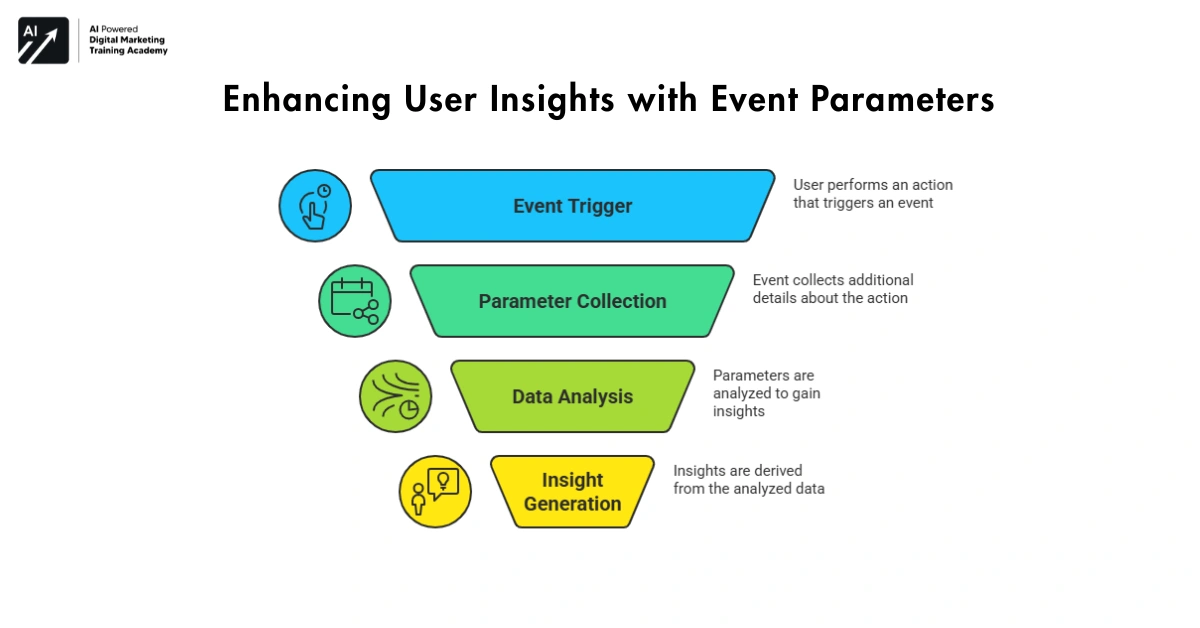
Event Parameter Strategy: Get More Insights from Each Action. In GA4 Skills, each event can send extra details called parameters. These help you understand the context of user actions.
For example, if someone clicks “Add to Cart,” parameters can track:
- Product name
- Price
- Quantity
- Category
This gives you richer insights than just counting clicks.
Why Event Parameter Strategy Matters
Without parameters, events only show basic numbers.
With parameters, you can:
- See which products are most popular
- Find patterns in user behavior
- Understand why users take certain actions
A good parameter strategy turns simple clicks into meaningful insights.
Tools & Tips
- Plan parameters before setting up events
- Use descriptive names for clarity
- Include parameters in reports and explorations
Key point: Event parameters let you get the full story behind every action on your site.
Final Thoughts: Why These GA4 Skills Work Best Together
Each GA4 skills is powerful on its own, but the real value appears when they work together and event tracking reveals behavior.
- Journey analysis explains decisions.
- Funnels show where problems happen.
- Traffic analysis identifies strong channels.
- Audience insights improve communication.
- Data clarity supports decisions.
- Optimization drives improvement.
Together, these skills turn analytics from simple reporting into a growth engine. The future of digital success will not depend only on traffic and it will depend on how well businesses understand their users and tools like Google Analytics 4 are designed to make that understanding possible.