
Editing videos today goes far beyond simply cutting clips or adding background music. Because people expect a lot from their screen time, creators must produce sharp, polished clips quickly no matter where they show up. Whether it’s Instagram, a classroom video, commercial ads, or streaming sites, moving images carry most of the message these days. Each year, that need pushes harder forward.
When people want more, old ways of editing start to fall behind. That is where machine learning steps in not as danger, but as real help. It lets creators remove dull chores, move faster through projects, while exploring new ideas once blocked by hours, talent, or money. Now machines help make visuals, tunes, move objects, plus adjust colors in clips. AI backs nearly each part of making videos.
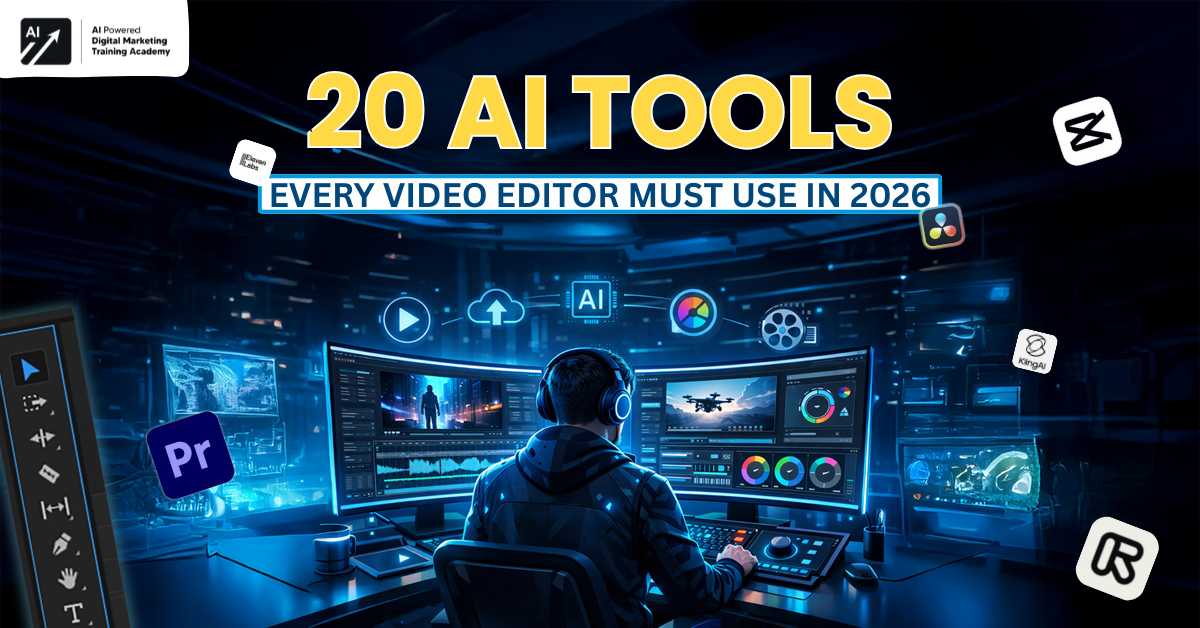
This guide shares 20 AI tools that every video editor must use in 2026. Each skill explains why it matters and how it helps in real life. You do not need to hurry. Just start with one tool.
Why Video Editors Must Use AI Tools Today
Lately, people want video material far more than before. Since then, companies turn to video ads to draw interest, artists make clips to grow their audience, while teachers apply them to teach bigger groups. Still, despite growing demands, schedules grow stricter while money runs short.
How AI Is Reshaping the Editing Industry
Video editors once handled many routine steps, including:
- Starting off by looking up clips online
- Cleaning and syncing audio
- Creating motion graphics manually
- Adjusting color grading shot by shot
These days, artificial intelligence helps handle or takes over tasks once done by hand. Picture software reviewing clips, pointing out possible tweaks or even shaping images straight from written ideas. It also makes tunes fit a scene’s feeling, while matching colors across every frame without manual adjustments.
Thanks to such software, editors waste almost no seconds on tricky settings. Most minutes vanish into refining scenes timing, tension, small gestures, real feelings take center stage instead.



Key Advantages of AI Adoption
Using AI tools provides multiple benefits:
- Faster turnaround times for projects
- Fewer reliance on big groups
- Consistent quality across videos
- Less burnout from repetitive work
- Ability to scale content production efficiently
What matters above all, is how AI helps video editors think ahead rather than stretch time too thin. Staying sharp in today’s fast-paced field isn’t just helpful, it simply must happen if you intend to last. Learning AI tools opens doors to future digital career opportunities beyond traditional editing roles.
AI Tools to Generate Stock Images and Videos
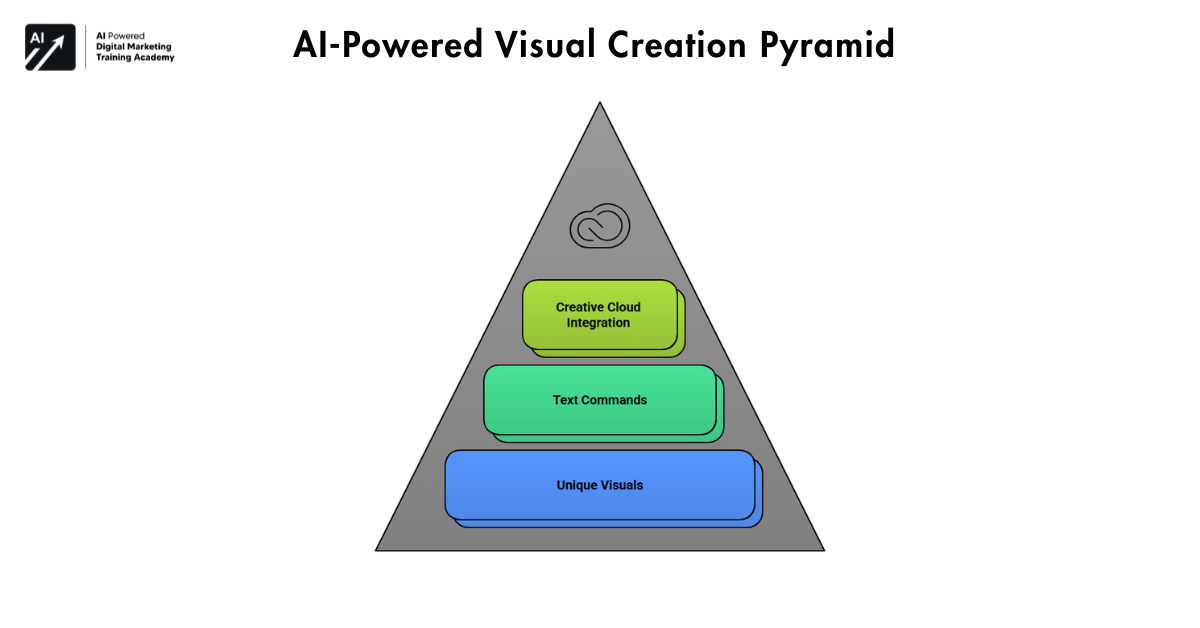 Pictures start each video. Still, old stock collections tend to cost too much, show few options, yet get reused again and again. New software changes that machines now draft unique images on the fly, matching exactly what the writer wrote.
Leading AI Tools for Visual Creation
- Adobe Firefly
With Adobe Firefly, video editors can create pictures, drawings, or visuals just by typing short commands. Since it links directly into Adobe Creative Cloud tools like Premiere Pro or After Effects, workers familiar with those apps gain a smooth advantage.
- HeyGen
Editors now have a way to make AI avatar videos using nothing but text, no cameras needed. Videos come together even without studios or real people involved. Perfect for short tutorials or intro guides that explain things clearly. Works just as well for showing how something works step by step online.
- Runway ML
From removing backgrounds to tracking objects, Runway ML handles tasks once limited to experts. Instead of specialized knowledge, it brings AI-powered video effects into reach.
- Synthesia
Editors now have the option to shape video presentations featuring AI characters, giving them the flexibility to work across different languages when targeting international viewers.
Why This Matters for Editors
Pictures made by artificial intelligence cut down expenses, remove reliance on ready-made image collections, while letting creators fully shape ideas. Since footage no longer limits scenes, visions fit perfectly with what the story needs, leading to fresher outcomes and smoother plots.
AI Tools to Generate Music and Sound Effects
What listeners experience comes partly from tracks and sound elements. Strong images might miss the mark when the audio fails to guide them. Yet tracking down suitable tunes by hand eats hours, also bringing worries about permission gaps.
Best AI Tools for Music and Audio
- AIVA
Emotions shape how AIVA composes backgrounds, tied closely to music styles, fitting well within film like narratives.
- Freepik Tunes
Freepik Tunes offers music made with artificial intelligence, suited for ads, reels, and brief online clips.
- Soundraw
Editors now pick mood, tempo, and time to make sounds through Soundraw control becomes sharp and clear when shaping music this way.
- Adobe Firefly (Audio Features)
Uses AI to generate and enhance background music and sound effects that automatically match your video’s mood and timing, saving hours of manual audio work.
How AI Improves Audio Workflow
Editors now use AI to create music that fits exactly how long a video is and how fast it moves. Hours once spent hunting tracks shrink because fewer options are needed. Because of this shift, attention turns toward mood and sequence instead of tracking down rights holders.
AI Tools to Generate Fonts and Typography
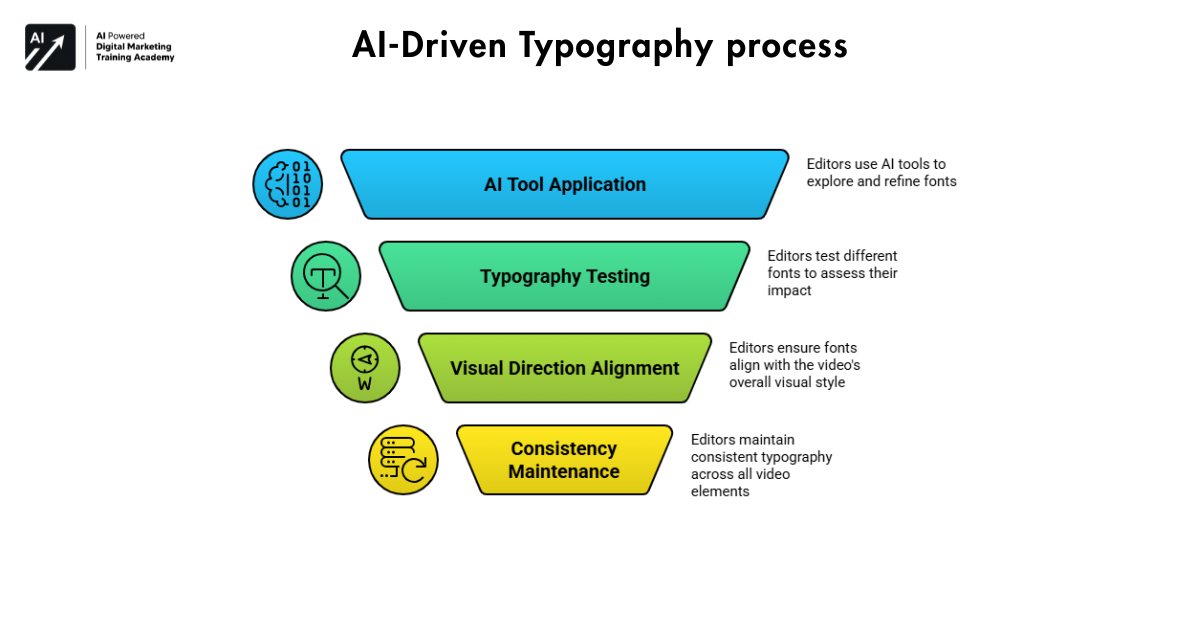 What we see on screen shapes whether the video seems reliable. The way text looks carries feeling, character, almost like a voice. Pick something out of place, strong material can still fall apart.
AI Typography Tools for Editors
- Refont AI
- Creative Fabrica
- FontLab
- Vondy
Why Typography Matters in Video Editing
Starting from unusual choices, editors now test different fonts at rapid pace through artificial intelligence guidance. Speed matters less when balance is kept across each piece tied to a clear visual direction. For teams managing large volumes of output, consistency becomes its own kind of creative force. Recognition grows quietly through repeated exposure shaped by thoughtful design choices.
AI Tools to Generate Animated Elements
How complicated thoughts become clearer. Views tend to stick around more when these elements are used. For years, making animation meant needing strong expertise. It also took plenty of hours just to get basic versions done.
AI Animation Tools Editors Use
- SVGator
- Krikey AI
- Presentations AI
- Magic Animator
Benefits of AI Animation
Now think about making videos fast. Some tools do that well. One thing they help with is getting motion pictures done quickly, even if design knows nothing about them. Since everything links together smoothly, working feels lighter than before. Because there is less waiting around, finishing feels more like moving forward instead of stopping.
AI Tools for LUTs and Color Grading
Mood, rhythm, or polish color grading shapes how a video feels. Good footage might still seem flat or off-balance unless the colors are carefully adjusted. Once upon a time, pulling this off took deep skill, patience, and many test runs. Still, AI now makes that step much easier.
Best AI Tools for Color Grading
- Film AI
With AI in movies, clips get analyzed while visual styles are added – perfect when editors need quick outcomes but aren’t color experts.
- Color.io
With Color.io, writers can align footage or stills to mimic original examples while keeping hues steady between scenes.
- LUT Builder AI
Editors get help making LUTs that match how a clip looks, thanks to LUT Builder AI learning its surroundings.
- Color lab AI
Across busy workloads, Color lab AI keeps output steady by repeating precise methods through extended timelines.
Why AI Color Grading Works
Using AI, systems now analyze factors like exposure, contrast, white balance, and color harmony without human help. This leads to
- Clip feels like something from a movie
- Visual consistency improves
- Editing time reduces drastically
What matters above all, AI helps color grading, so editors care more about tales when less time fixes settings.
AI vs Traditional Video Editing: What Still Needs Humans
Power moves through AI, yet creativity stays beyond its reach when measured by human standards. Seeing clearly how machines operate differs from where people step matters for lasting outcomes.
What AI does best
- Is how well AI performs in certain areas.
- Automating repetitive tasks
- Patterns detected
- Generating variations quickly
- Maintaining consistency
Take film editing. Machines might pick key moments, shoot background scenes, or adjust hues quicker than people. That changes how work gets done.
What humans still control
A human editor brings:
- Emotional judgment
- Storytelling sense
- Cultural and audience understanding
- Instinct shapes art
A break doesn’t mean much to AI, it won’t recognize sorrow in stillness. Instead of feeling, people control when to speed up or slow down. What moves us comes from human choice, not machines.
The Right Balance
A mix of artificial intelligence working alongside human creativity. People who hand off routine tasks to AI yet keep guiding artistic choices tend to make stronger work. Work done entirely by machines often falls short.
How Freelance Video Editors Can Use AI to Earn More
Nowhere is the struggle clearer than in how little time freelance editors have. Money demands only make things tighter. Machines learning fast begin shifting both limits. Not magic, just method changing outcomes. AI tools help editors earn more as a freelance video editor by finishing projects faster and taking more clients.
Time Leverage With AI
AI reduces time spent on:
- Searching stock footage
- Creating captions and animations
- Color grading gets tweaked
Freelancers can handle additional jobs by doing this yet still work the same amount of time.
Income Opportunities With AI
Freelancers might provide upgraded options like:
- AI avatar explainer videos
- AI-enhanced reels and shorts
- Cinematic AI color grading
- Speedier package deliveries
People pay for outcomes, not hours logged. With AI, independent workers deliver more worth quicker. Editors can also earn by reviewing AI tools they already use for video creation.
Long-Term Advantage
Freelancers ease strain by leaning on smart AI tools. Work flows smoother when repetitive tasks shift out of focus. Income climbs gently, yet inspiration stays unshackled.
How Agencies Use AI to Scale Video Production
One moment it’s juggling several customer relationships. Right after that comes racing against clock targets. Then there’s handling varied ways people consume information. Suddenly, artificial intelligence steps in making operations stretch further. All of this happens while avoiding added human resources too soon.
Where Agencies Use AI Most
Here’s a list showing how agencies often apply artificial intelligence:
- Generating stock visuals at scale
- Maintaining brand consistency
- Automating animations and captions
- Speeding up revisions
Benefits for Agencies
AI enables:
- New editors join faster now.
- One big win is lower operational expenses.
- Higher client satisfaction
- Consistent output quality
So, agencies now use AI to scale digital services efficiently without hiring large teams.
Ethical Use, Copyright, and AI Safety in Video Editing
Nowhere is fairness tested like in AI editing. When machines shape content, someone behind the scenes needs to see the bigger picture. Mistakes happen if rules are ignored or values overlooked. Real safety comes from knowing limits before pushing them too far.
Key Ethical Considerations
Editors need to:
- Check commercial licensing
- Stay clear of false information
- Keep things open with clients
- Use AI responsibly
Copyright Awareness
Even when machines create pieces, who actually owns them depends on where they post or live. Before sharing or profiting from AI output, publishers need to check if they’re allowed to do so at all.
Human Responsibility
Tool in hand, people still write the story. Judgment lives in humans, never handed off completely.
Understanding AI usage also requires awareness of digital product development costs and licensing.
Common Mistakes Video Editors Make When Using AI
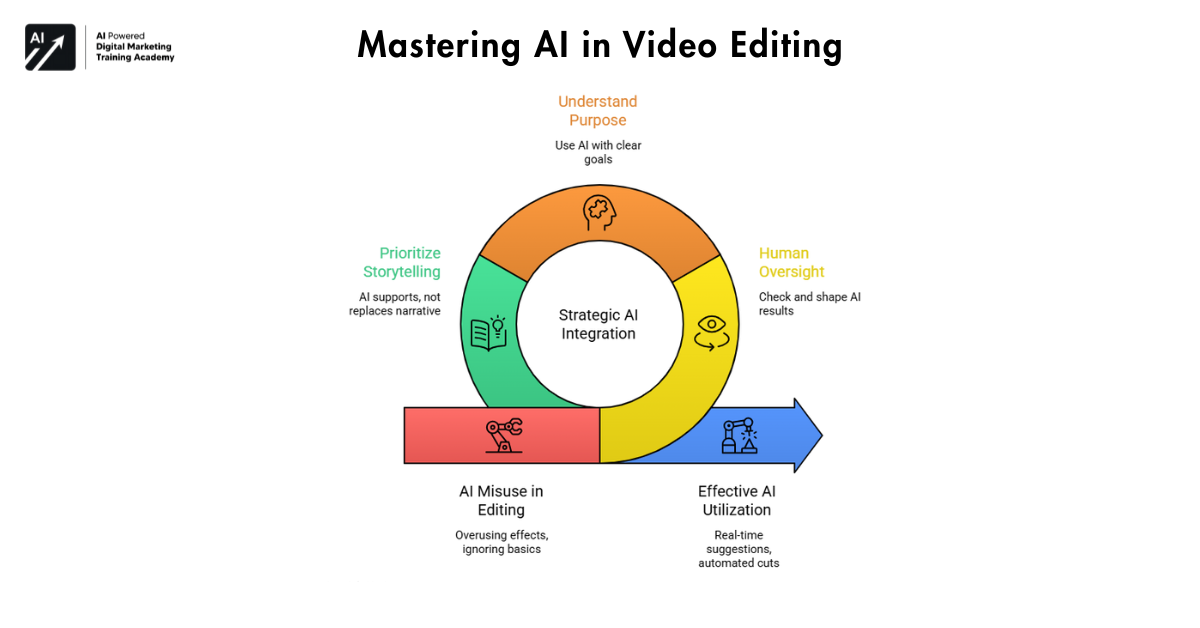 Even though it helps, someone might twist AI’s power.
- Common Mistakes
- Overusing AI effects
- Trusting automation without question
- Ignoring storytelling basics
- Using AI without understanding purpose
What you can do to stay clear of these issues
Editors see AI as help, never replacement. Each result from machines needs checking, shaping, until it fits the narrative.
The Future of AI in Video Editing
AI will continue evolving rapidly. In the coming years, editors can expect:
- Real-time editing suggestions
- Automated rough cuts
- Personalized editing styles
- Smarter content optimization.
Starting early gives editors stronger benefits over time. Falling behind now can create much bigger challenges in the future. AI-powered videos already drive results in large-scale digital campaigns across major brands.
Final Thoughts: AI Is a Creative Partner, not a Threat
AI is not here to replace video editors. Instead, it boosts originality, cuts down tedious tasks, speeds up workflows. Those who learn AI features without losing sight of strong narratives they’re the ones still needed down the line.
Try mixing things. Let machines manage pace and repetitive tasks. Meanwhile, people guide feeling, storytelling, imagination. Balance sits where tech meets touch. What keeps video editors ahead isn’t magic, its smart tools working right beside them.